Design your own hat in 3D
Alpha Crowns Studio is a browser-based 3D hat designer. Build a cap part by part, choose real materials and colors, add your logos and text, preview premium finishes, then turn the finished design into a manufacturer-ready tech pack — all from one interactive model.
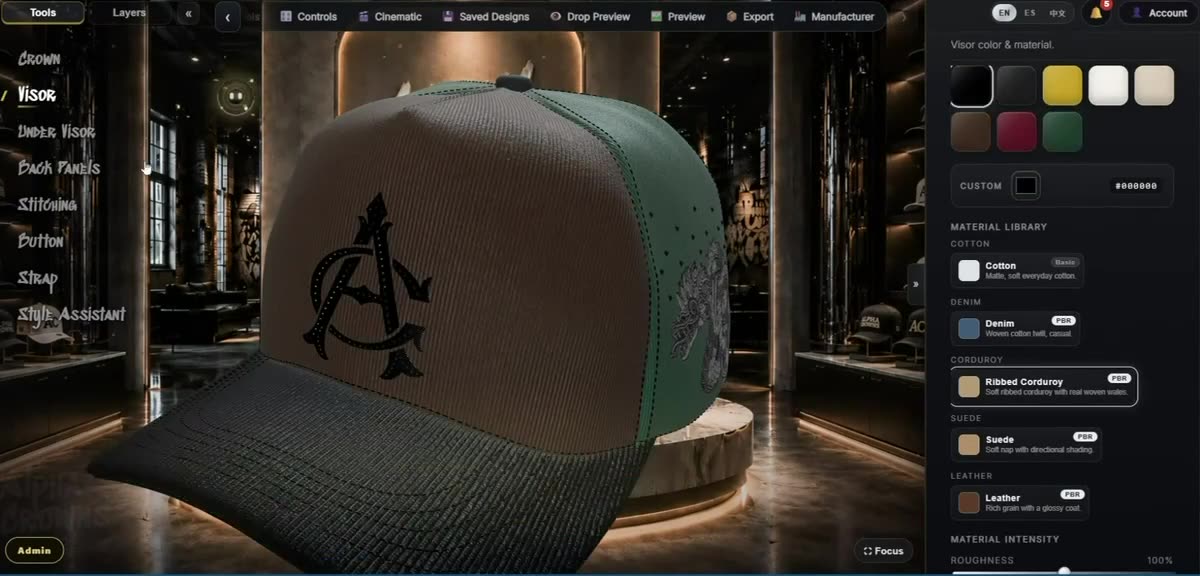
What this is: a designer’s tool. You shape a real 3D cap yourself, in detail, and every choice becomes part of a spec you can hand to a factory — not a flat mockup, and not a one-click “type a prompt, get a hat” generator.
Customize every part of the cap
A cap is a hundred small decisions, and the studio gives you each one rather than treating the hat as a single flat surface. You control the crown panels, the visor and under-visor, the back panels (including mesh for trucker builds), the top button, the stitching, and the strap and closure — each its own part, with its own color and, where it applies, its own material.
Choose real materials and colors
Parts are rendered with distinct fabric looks — cotton, denim, corduroy, suede, leather and satin among them — so a suede crown reads differently from a denim one under the same studio light. Color is applied per part, so the crown, visor, under-visor, back panels, button, stitching, strap and buckle can each be their own shade. Because color and material are separate controls, one material supports any color you pick without swapping to a different texture.
Add logos and text
Upload your own artwork and place it on the cap, then resize and rotate it to sit where you want across the front, sides, back and brim zones. Add text layers for names, numbers or slogans, and add woven, strap and interior labels for branding details a real cap carries. If you want help shaping a mark or wordmark, the studio also includes AI-assisted logo and text tools — see the AI hat design page for exactly what those do and do not do.
Preview embroidery, 3D puff and premium finishes
Decoration is not just a flat picture pasted on the hat. You can preview finishes including flat embroidery, raised 3D puff, metallic thread, and premium details like gems and pins, so you can judge how a logo will read as a stitched or dimensional treatment rather than a print. For a deeper walkthrough of previewing stitched treatments, see the hat embroidery designer.
These finish views are design-time visualization to help you make decisions — they are not a digitizing or stitch-file (DST) engine, and the exact stitch-out is still something your embroiderer or digitizer confirms.
Customize the interior
The inside of the hat is designed too, not left as an afterthought. You can set the interior lining, the support tapes and the sweatband, add interior artwork or a monogram, and apply branding to the interior tapes — the details that make a cap feel finished and yours from the moment it is turned inside out.
Visualize it before you commit
The cap sits in a real 3D scene you can rotate and inspect from any angle, with studio lighting and background scenes so the design reads like a product shot rather than a wireframe. Seeing the hat in the round — front logo, side profile, back closure, underside of the visor and the interior — is how you catch the things a single flat image hides.
From design to a hat tech pack
When the design is ready, the same model drafts a manufacturer-readable spec sheet: multi-angle views, the material and color of each part, artwork placement, labels, and a checklist of what to confirm before production. You save it as a PDF from your browser. This is the bridge most design tools skip — a picture of a hat is not the same as instructions a factory can build from.
Read more on the hat tech pack page, which explains what the document captures and how it differs from a blank template.
Prepare for a manufacturer and request quotes
Alpha Crowns Studio is a design and specification platform, not a factory — and that neutrality is deliberate. Once your tech pack is ready, you can request quotes from manufacturers inside the app and message them per quote, so you take the same design to the makers you choose rather than a single captive supply chain.
How it fits together, step by step
- Build the cap in 3D — base, panels, materials, colors, button, stitching, strap and closure.
- Add branding — upload and place logos, add text, add woven and interior labels.
- Choose finishes — preview flat, 3D puff, metallic thread and premium details.
- Finish the interior — lining, tapes, sweatband and interior artwork.
- Generate the tech pack — multi-angle views, specs, checklist; save as PDF.
- Request quotes — send it to manufacturers and confirm details before a sample.
Built for real hat production
Every part of the studio points toward a real hand-off to a maker, so it stays clear about where your judgment — and your manufacturer — lead:
- You direct every detail in real 3D. This is a designer’s tool, not an AI that decides the hat for you.
- Embroidery and 3D puff finishes are previews that show how a logo will read on the cap — your embroiderer still digitizes the final artwork.
- Measurements are a confident starting point on a standard adult cap; you and your manufacturer confirm final materials, thread and Pantone colors, sizing and embroidery before production.
- Alpha Crowns Studio is an independent design platform in private beta — it prepares your spec and connects you to the manufacturers you choose, never a single captive supply chain.
FAQ
- Do I need 3D or design experience to use it?
- No. You customize a real cap by picking parts, colors and materials and by placing your own logos and text. It works in a normal web browser, and you drag to rotate and zoom the hat as you build it.
- Can I upload my own logo?
- Yes. You can upload artwork and then position, resize and rotate it on the cap. You can also add text layers and woven, strap and interior labels.
- Is the embroidery and 3D puff preview a real stitch file?
- No. The flat, 3D puff and premium-thread views are design-time previews to help you visualize the finish. They are not a digitizing or stitch-file engine, and stitch-out details should be confirmed with your embroiderer or digitizer.
- What can I do with the design when I am finished?
- You can generate a manufacturer-readable tech pack from the same design and save it as a PDF, then request quotes from manufacturers inside the app.
- How do I get access?
- Alpha Crowns Studio is in private beta. Open the Studio to sign in or request an account; access is granted after approval.
Design your own hat in 3D, then take it to production.
Private beta — sign in or request an account, then start designing once approved.