AI-assisted hat design
Alpha Crowns Studio uses AI where it genuinely helps — creating and styling logos and lettering, and guiding your design decisions — then hands the work back to you in a real interactive 3D hat designer. It is AI plus a real studio, not a prompt box that spits out a finished hat.
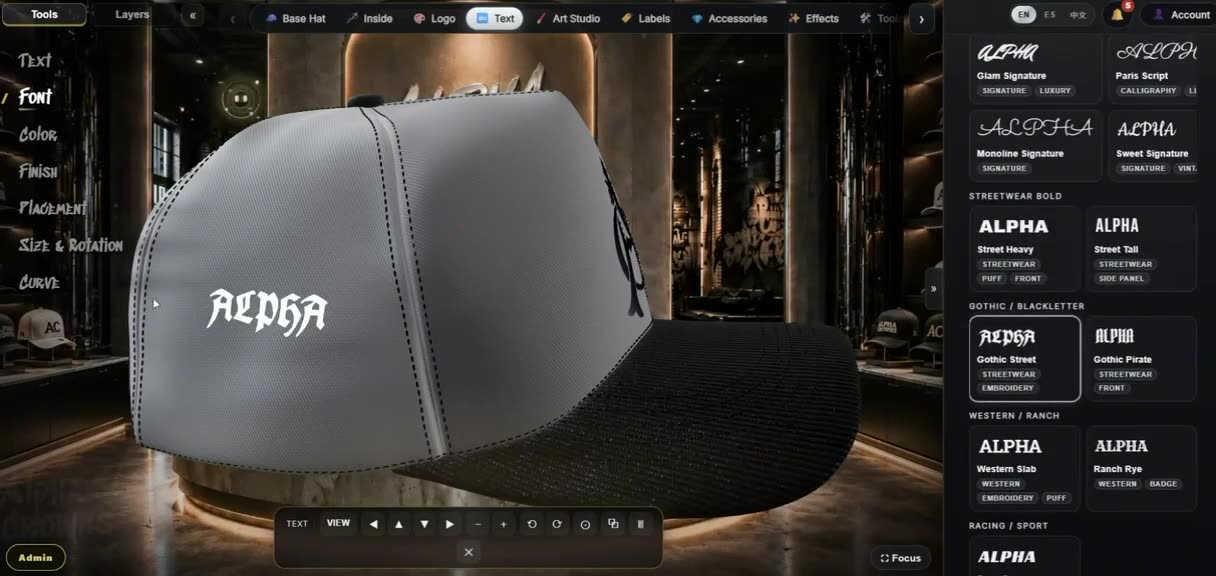
What “AI hat design” means here: the AI works on your artwork and choices — logos, lettering and design guidance — while you shape the actual cap in 3D. It is a genuine head start, not a machine that guesses the whole hat for you.
AI-assisted logo and text creation
Start a logo from an idea and let the AI generate emblem artwork, or take text you type and have it rendered as a styled treatment. The styles are built around real headwear finishes, so what you preview looks like how the mark could actually be made:
Logo & emblem looks
- Flat vector / graphic logo
- Embroidered emblem & appliqué patch
- Chenille patch and gem / rhinestone looks
- Enamel metal pin and debossed leather
- Monogram crest, wordmark and mascot badge
Text & lettering finishes
- Flat satin-stitch embroidery lettering
- Raised 3D puff / foam lettering
- Chenille varsity lettering
- Liquid-chrome and luxury-serif treatments
- Your exact words — the AI never rewrites your text
Text mode renders the exact text you enter; it does not invent brand names or copy for you.
A Design Assistant for the rest of the decisions
Beyond artwork, a built-in Design Assistant offers guidance while you work: color pairings, material and fabric suggestions, embroidery-style directions, and which studio scene suits a given look. It is a recommendation tool: it proposes ideas and directions, and you choose what to apply — nothing changes on the hat until you make it so.
Bring the AI artwork into real 3D customization
AI is a starting point, not the finish line. A generated logo or a styled wordmark becomes a layer you place, resize and rotate on a real 3D cap, alongside everything the studio controls by hand — crown, visor and panel materials and colors, the button, stitching, strap and closure, and the full interior. This is where an idea turns into a specific, buildable hat. See the full workflow on the 3D hat designer page.
Preview finishes before you commit
Because the artwork styles map to real decoration, you can preview how a logo reads as flat embroidery, raised 3D puff, metallic thread or a premium detail like gems or pins — on the hat, in 3D, from any angle.
These are design-time previews for visualization. Neither the AI nor the preview is a digitizing or stitch-file (DST) engine, and the exact stitch-out is still confirmed with your embroiderer or digitizer.
From AI concept to tech pack and manufacturer
Once the design is set, the same model drafts a manufacturer-readable tech pack — multi-angle views, materials and colors per part, artwork placement, labels and a checklist — that you save as a PDF and use to request quotes from manufacturers inside the app. The AI helps you get to a strong design faster; the production path is the same real, spec-driven flow.
What the AI does — and does not do
It does
- Generate logo / emblem artwork from an idea
- Style your exact text into headwear finishes
- Suggest colors, materials, layouts and scenes
- Give concept directions you choose to apply
It does not
- Generate a finished, ready-to-order hat by itself
- Rewrite or invent your brand name or copy
- Digitize artwork or produce a stitch file
- Change your design without your input
How it fits together, step by step
- Generate or style artwork — a logo from an idea, or your exact text in a chosen finish.
- Ask the Design Assistant — for color, material, embroidery-style and scene guidance.
- Customize the cap in 3D — place the artwork and set every part yourself.
- Preview the finish — flat, 3D puff, metallic thread, gems and pins.
- Generate the tech pack — and request quotes from manufacturers.
FAQ
- Does the AI generate a finished hat from a text prompt?
- No. The AI helps with the artwork and with design guidance. It can generate and style logos and lettering, and it can suggest colors, materials and layouts. You still customize the actual cap yourself in the interactive 3D studio.
- What can the AI actually create?
- It can generate logo and emblem artwork and stylized lettering in finishes such as flat embroidery, 3D puff, chenille, appliqué patch, metal pin, chrome and gem looks. In text mode it renders the exact words you type; it does not invent your brand name.
- Is the AI a digitizing or stitch-file tool?
- No. The AI produces artwork and previews to help you design. It is not a digitizing or stitch-file (DST) engine, and stitch-out details are still confirmed with your embroiderer or digitizer.
- Do I have to use the AI?
- No. The AI tools are optional. You can upload your own artwork and design the entire hat without them, or use the AI only for a logo idea or a starting style.
- How do I get access?
- Alpha Crowns Studio is in private beta. Open the Studio to sign in or request an account; access is granted after approval.
Start a logo with AI, then design the whole cap in 3D.
Private beta — sign in or request an account, then start designing once approved.