A hat tech pack, generated from your design
Design a cap in Alpha Crowns Studio and the app drafts a manufacturer-readable spec sheet from what you built — multi-angle views, materials, colors, artwork placement, labels and a checklist — ready to print or save as a PDF.
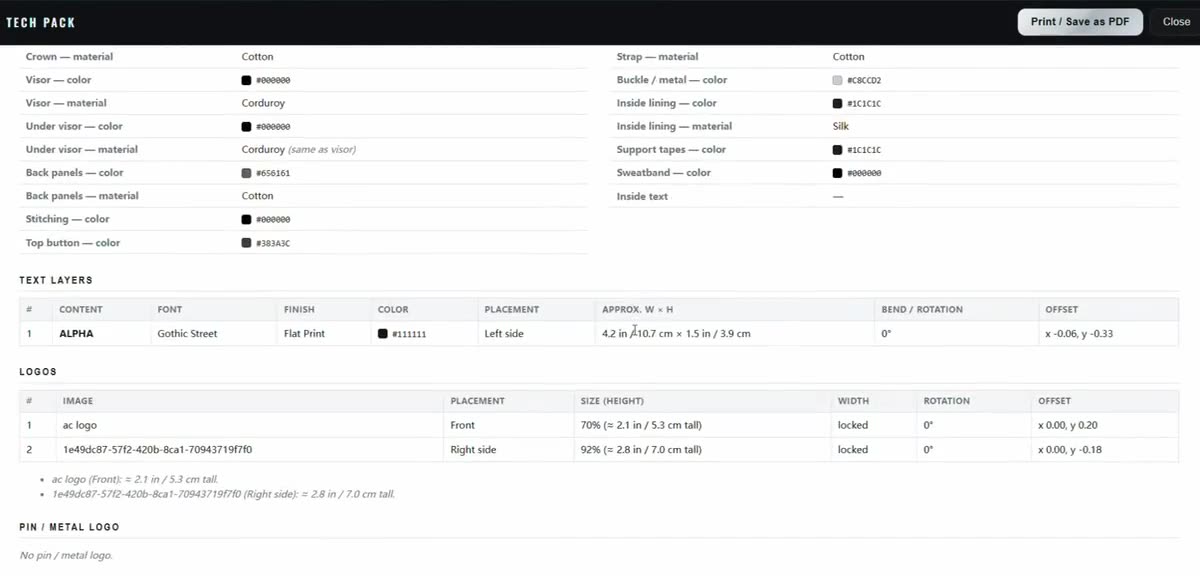
What a hat tech pack is
A tech pack (technical package) is the spec document a factory works from. For headwear it collects the details a maker cannot guess: the cap silhouette and panel structure, the fabric or material of each part, thread and hardware colors, where every logo and text sits, label and interior details, and reference views from several angles. It is the shared reference that turns "here is my idea" into "here is exactly what to make."
Why manufacturers need organized specs
Caps are made from many small decisions — crown fabric, visor color, back-panel mesh, stitching, button, strap and buckle, sweatband, interior lining. A single reference photo leaves most of that open to interpretation, which is how samples come back wrong. An organized spec sheet gives the manufacturer one place to read the colors, materials and placements, and one checklist to confirm against before cutting fabric. It also gives you a portable document you can hand to more than one maker.
What Alpha Crowns Studio captures today
The Tech Pack is drafted from your live 3D design. Based on what you have added, it includes:
- Design summary and multi-angle views — front, left, right, back, top and inside captures of your cap.
- Exterior specs — crown, visor, under-visor and back-panel colors and materials, mesh hole size, stitching color and top-button color.
- Hardware & interior — strap color and material, buckle/metal color, inside lining, support tapes, sweatband, and any inside text.
- Artwork & labels — text layers and logos with placement, approximate size and finish; pin / metal logo details; interior artwork and interior tape branding when used.
- Presentation — the background scene and lighting used for the reference renders.
- A manufacturing checklist — the points to confirm with the maker before bulk production.
- Production notes — your own notes, or an auto-drafted starting point.
Inside the Studio, a readiness checklist also flags which core specs you have filled in so far — main colors, materials, decoration, artwork placement and finish, labels, and production notes — so you can see what is still blank before you export. The document itself can be generated in English, Spanish or Chinese.
How you export it today
When the Tech Pack is ready it opens in a preview inside the Studio with a Print / Save as PDF button, which uses your browser's print dialog to produce a PDF you can send or file. That browser-based PDF is the export that works today.
From design to manufacturer, step by step
- Design — build the cap in 3D: base, colors, materials, panels, logos, text and labels.
- Review — check the readiness checklist and fill in anything still blank; add production notes.
- Tech Pack — generate the spec sheet and save it as a PDF.
- Manufacturer confirmation — send it to a maker and confirm materials, colors, sizes and embroidery together before approving a sample or bulk run.
Honest limitations
The Tech Pack is a strong starting point, not a finished factory contract. A few things to keep in mind:
- Dimensions are approximate — they assume a standard adult cap and must be confirmed with your manufacturer.
- The 3D embroidery, 3D puff and premium-thread views are design-time previews for visualization. They are not a digitizing or stitch-file (DST) engine, and a preview does not replace confirmation with your manufacturer or digitizer.
- Final materials, construction, thread and Pantone colors, seam alignment and embroidery specifications must be confirmed with the manufacturer (and, for embroidery, your digitizer) before production.
Think of the Tech Pack as the organized brief you and your maker review together — it does not, on its own, determine how a sample will turn out.
FAQ
- Is a tech pack the same as a mockup?
- No. A mockup shows what the cap could look like; the tech pack records the specs a factory needs to make it. In Alpha Crowns Studio both come from the same 3D design.
- What format do I get?
- A printable spec sheet you save as a PDF from your browser. The document can be generated in English, Spanish or Chinese.
- Will my hat be made exactly as shown in the Tech Pack?
- No. It organizes your specs and gives your manufacturer a checklist to confirm against. Materials, colors, sizes and embroidery still need to be confirmed with the maker and digitizer before a sample or production run.
- Do the embroidery and 3D puff previews replace digitizing?
- No. They are visual previews to help you design. Your embroiderer still digitizes the artwork, and stitch-out details should be confirmed with them.
- How do I get access?
- Alpha Crowns Studio is in private beta. Open the Studio to sign in or request an account; access is granted after approval.
Build a tech pack from your own hat design.
Private beta — sign in or request an account, then start designing once approved.
Related: design your hat in the 3D hat designer · preview embroidery on your cap · start a logo with AI hat design